Complete Guide: How to Create Messaging Stickers
Discover the most efficient 6-step workflow to create professional-grade sticker sets using EzStampify's AI-powered batch tools.
Table of Contents
Prepare Assets: Illustration & AI
Start with your own illustrations, AI-generated images, or even photos of your pets. Quality starts with a clear source and a creative idea.
When using AI, choose images with simple backgrounds and high contrast to make the background removal step much easier.
Remove Background: AI or Color Key
Our AI Background Remover handles complex details like hair with ease. Since it processes locally, your assets are never sent to external servers. For solid white backgrounds, try Color Keying for near-instant results.
Split Image: Grid or Auto-detect
Extract multiple illustrations from a single canvas into individual PNGs. If your artwork is neatly aligned, we highly recommend 'Grid Split' for its perfect accuracy and predictable results.
Use the AI-powered 'Auto-Split' if your layout is irregular. If grid lines need fine-tuning, try using 'Margin Cut' first to clean up your canvas edges.
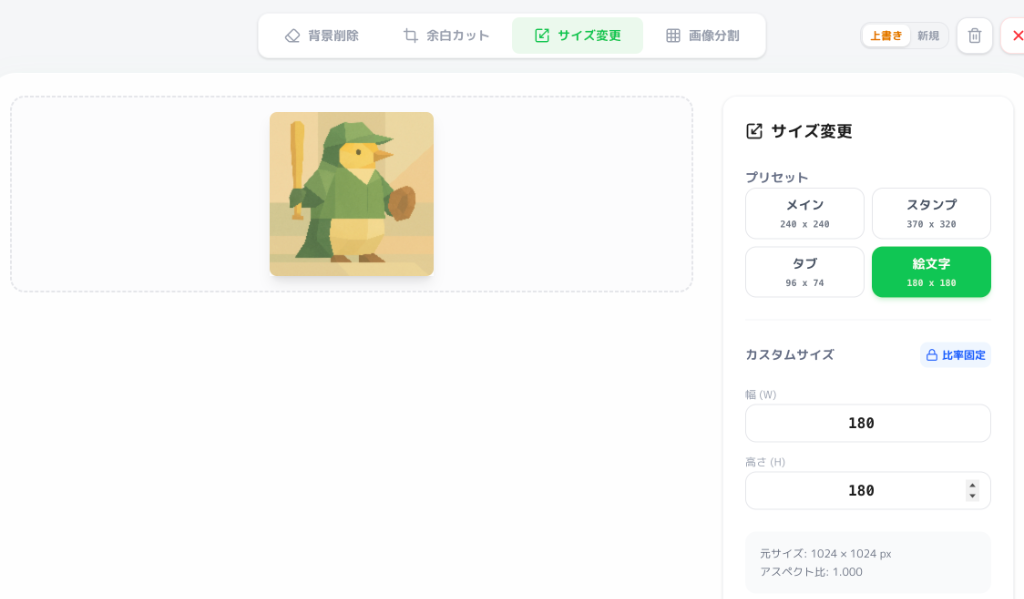
Resize with Presets
Simply select our Sticker Presets. We handle the complex pixel math and ensure the required safety margins for a worry-free submission to official stores.
Use the 'Save as New' feature to create both your 'Main' image and individual stickers from the same source without starting over.
Polish: Eraser & Text Tool
Fix artifacts with the Eraser Tool and add personality with our Text Tool. Be sure to add outlines to your text to ensure it's easily readable in both light and dark chat themes.
Select All & Export ZIP
Select your final set and click Download. Your files are automatically named (e.g., 'main.png', 'tab.png', '01.png') according to official standards. If you export multiple images of the same type, they will be named like 'main.png' and 'main(2).png' automatically. Just unzip the package and upload it—no more tedious manual renaming!
Final Checklist
- Background is properly transparentized
- Sufficient margins (up/down/left/right) are maintained
- All required images (Main/Tab/Stickers) are present
- Consistency between the designated tags (Suggest keywords) and the sticker visuals
- No violation of copyrights or public order and morals